
Storing a station
1. "Radio"
2. "FM" or "AM"
3. Highlight the desired station.
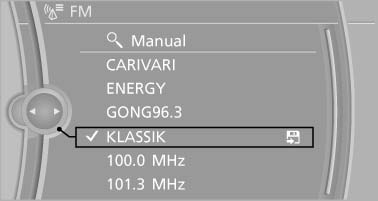
Highlight the desired station
4. Press the controller for an extended period.
5. Select the desired memory location.
The stations are stored for the remote control currently in use.
The stations can also be stored on the programmable memory buttons
See also:
Example: setting the clock
Setting the clock
1. Press the button. The main
menu is
displayed.
2. Turn the controller until "Settings" is highlighted,
and then press the controller.
3. If necessary, move the ...
Indicator/warning lamps
Indicator/warning lamps
The indicator and warning lamps can light up in
a variety of combinations and colors.
Several of the lamps are checked for proper
functioning and light up temporarily ...
Resetting values
The average fuel consumption and average
speed can be reset.
Press and hold the computer button on the turn
signal lever. ...