
Selecting a station
1. "Radio"
2. "FM" or "AM"
3. Select the desired station.
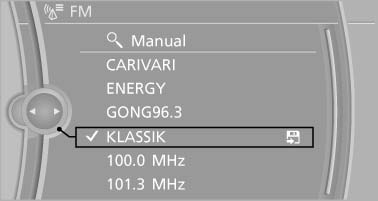
Select the desired station
All saved stations are stored for the remote control currently in use.
Changing the station
Turn the controller and press it
or  Press the button
or Press the buttons on the steering wheel
Press the button
or Press the buttons on the steering wheel
See also:
Snap-in adapter
Installation locationIn the center armrest.
Inserting snap-in adapter
1. Press the button and remove the cover.
2. Insert the snap-in adapter at the front, arrow 1, and press downward, ...
Comparison with ordinary remotecontrol
The functions can be controlled by pressing the
buttons of the remote control or Comfort Access.
Unlocking
Grasp the door handle on the driver's or front
passenger door completely, arrow 1. This ...
Entering a street and intersection
1. Select "Street" or the displayed street.
2. Enter a street and intersection in the sameway as you would
enter a town/city.
If there are several streets with the same name:
1. Change ...