
Programming
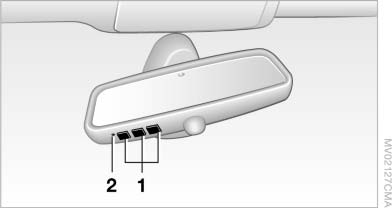
Programming
1. Memory buttons
2. LED
Fixed-code hand-held transmitters
1. Switch on the ignition, refer to page 61.
2. Initial setup:
Press both outer memory buttons 1 for approx.
20 seconds until the LED flashes.
All programs of the three memory buttons 1 are cleared.
3. Hold the hand-held transmitter at a distance of approx. 1 to 3 in/2.5 to 8 cm from the memory buttons.
The required distance depends on the particular hand-held transmitter.
4. Simultaneously press the transmit button of the hand-held transmitter and the memory button of the integrated universal remote control.
The LED flashes slowly.
5. Release both buttons when the LED flashes rapidly.
If the LED does not flash rapidly after approx.
60 seconds, change the distance and repeat the step.
Canada: if the LED does not flash rapidly after approx. 60 seconds, change the distance and repeat the step. If programming was aborted by the hand-held transmitter, hold down the memory button and press and release the button on the hand-held transmitter several times for 2 seconds.
6. To program additional hand-held transmitters, repeat steps 3 to 5.
The device can be operated using the memory button with the engine running or the ignition switched on.
Malfunction
If the device cannot be used after repeated attempts at programming, please check whether the hand-held transmitter is equipped with an alternating code system.
To do so:
▷ Read the instructions of the hand-held
transmitter.
▷ Press the memory button of the universal
remote control for an extended period.
If the LED of the integrated universal remote control flashes quickly for a short period and then lights up continuously, the hand-held transmitter is equipped with an alternating code system.
In this case, program the memory buttons as described under Alternating-code hand-held transmitters.
Alternating-code hand-held transmitters
Please obtain information on synchronizing the device in the operating manual of the device being set up.
Programming will be easier with the aid of a second person.
1. Park the vehicle within range of the remotecontrolled device.
2. Program the integrated universal remote control as described above under Fixedcode hand-held transmitters.
3. Locate the button on the receiver of the device to be set, e.g., on the drive.
4. Press the button on the receiver of the device to be set. You have approx. 30 seconds for the next step.
5. Press the programmed memory button of the integrated universal remote control for approx. 3 seconds. Repeat this step up to three times if necessary.
The device can be operated using the memory button with the engine running or the ignition switched on.
See also:
xDrive
xDrive is the all-wheel-drive system of your vehicle.
Concerted action by the xDrive and DSC
further optimize traction and driving dynamics.
The xDrive all-wheel-drive system variably distributes ...
Strength of the driver's and front
passenger airbag
The strength with which the driver's and front
passenger airbags are triggered depends on the
position of the driver's and front passenger
seats.
To maintain the accuracy of this function over ...
High beams, headlamp flasher
High beams, headlamp flasher
▷ High beams, arrow 1.
▷ Headlamp flasher, arrow 2. ...