
Preselecting activation times
1. "Settings"
2. "Climate"
3. "Activate Timer 1" or "Activate Timer 2"
4. "Timer 1:" or "Timer 2:"
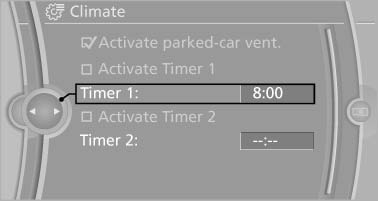
Preselecting activation times
5. Set the desired time.
 The symbol on the
automatic climate control
lights up when the switch-on time is activated.
The symbol on the
automatic climate control
lights up when the switch-on time is activated.
 The symbol on the automatic
climate control
flashes when the system has been switched on.
The symbol on the automatic
climate control
flashes when the system has been switched on.
The system will only be switched on within the next 24 hours. After that, it needs to reactivated.
See also:
2012 BMW 3 Series: Up Close
Of all BMW's cars, the 3 Series is the one that somehow escaped being hit by
the Chris Bangle ugly stick, so I didn't go to the redesigned compact sedan's
North American debut looking for sweet re ...
Unlocking and opening
► Either unlock the doors together using the
button for the central locking system and
then pull the door handle above the armrest
or
► Pull the door opener twice individually on
each ...
Capacities
...