
Rear operation
The control unit is located in the center console in the rear.
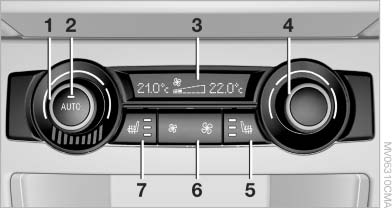
Rear operation
1. Temperature, left rear seating area
2. AUTO program
3. Display
4. Temperature, right rear seating area
5. Seat heating, right rear seat
6. Air volume, manual
7. Seat heating, left rear seat
The current setting for the temperature and the air flow rate is shown on display 3.
Activation/deactivation
1. "Settings"
2. "Climate"
3. "Rear climate control"
4. Select the desired settings.
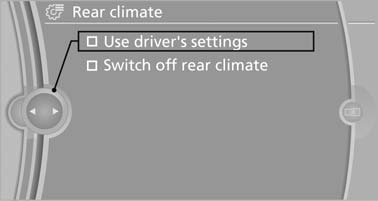
Select the desired settings
The rear automatic climate control cannot be operated if the front automatic climate control is switched off. With the defrost windows and eliminate condensation function activated, the rear automatic climate control is also not ready for operation.
AUTO program
 The AUTO program automatically
sets the air distribution toward the
upper body and in the footwell, as
well as the air flow rate. It also
adapts your instructions for the
temperature to outside influences throughout
the year.
The AUTO program automatically
sets the air distribution toward the
upper body and in the footwell, as
well as the air flow rate. It also
adapts your instructions for the
temperature to outside influences throughout
the year.
Temperature
 Set the desired temperature
individually
on the left and right side.
Set the desired temperature
individually
on the left and right side.
The automatic climate control achieves this temperature as quickly as possible regardless of the season, using maximum cooling or heating power if necessary, and then maintains it.
When switching between different temperature settings in rapid succession, the automatic climate control does not have sufficient time to adjust the set temperature.
Air volume, manual
 The air flow rate can be varied
by pressing
on the corresponding side. The automatic
mode for the air flow rate can be
switched on again using the AUTO button.
The air flow rate can be varied
by pressing
on the corresponding side. The automatic
mode for the air flow rate can be
switched on again using the AUTO button.
Switching off rear automatic climate control
 With the blower at its lowest
setting,
press the left side of the button to
switch off the automatic climate control.
With the blower at its lowest
setting,
press the left side of the button to
switch off the automatic climate control.
The automatic climate control can also be switched off with iDrive. To switch on the automatic climate control again, the system must first be reactivated, refer to Activating/deactivating.
The system is switched on again by pressing any button of the rear automatic climate control.
See also:
Hiding Check Control messages
Hiding Check Control messages
Press the button in the turn signal lever up or
down.
▷ Some Check Control messages are displayed
continuously and are not cleared until
the malfunction i ...
Bluetooth audio
At a glance
Music files on external devices such as audio
devices or mobile phones can be played
back via Bluetooth.
Use of a mobile phone as an audio source.
The sound is output on the ...
Safety
BMW's inflatable tubular Head Protection System includes side curtain-type
airbags for the first and second rows. Front-seat side-impact airbags are
installed, and rear side-impact airbags are opt ...