
Switching the high beams on and off manually
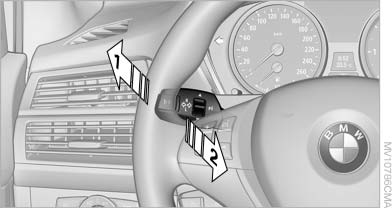
Switching the high beams on and off manually
▷ High beams on, arrow 1.
▷ High beams off/headlamp flasher, arrow 2.
To reactivate the High-beam Assistant, briefly push the turn indicator lever toward the high beams.
See also:
Avoid high engine speeds
Driving at a low engine speed reduces fuel consumption
and minimizes wear. ...
General information
The safety switch in the driver's door can be
used to prevent children, for example, from operating
the roller blinds using the switches in the
rear.
Press the safety switch in the driver's doo ...
Opening/closing the sliding visor
You can move the sliding visor independently
with the sunroof closed or tilted.
▷ Press the switch in the
desired
direction to the resistance
point and hold it there.
The sliding viso ...