
Units of measure
Setting the units of measure
To set the units for fuel consumption, route/distance, temperature, and pressure:
1. "Settings"
2. "Language/Units"
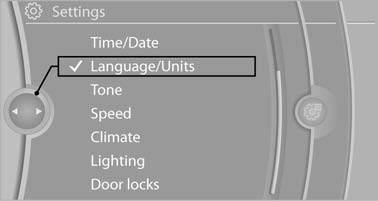
Language/Units
3. Select the desired menu item.
4. Select the desired unit.
The setting is stored for the remote control currently in use.
See also:
Retreaded tires
The manufacturer of your vehicle does not recommend
the use of retreaded tires.
Retreaded tires
Possibly substantial variations in the design
and age of the tire casing structures can
limit ...
The concept
This system projects important information into
the driver's field of vision, e.g., navigation instructions.
In this way, the driver can get information without
averting his or her eyes from the ...
Roadside parking lamps
The vehicle can be illuminated on one side.
Switching on
With the ignition switched off, press the lever
either up or down past the resistance point for
approx. 2 seconds.
Switching off
Brie ...