
Service status
Displaying available services
Display of all services available in the vehicle.
1. "BMW Assist" or "ConnectedDrive"
2. "Service Status"
3. "Available services"
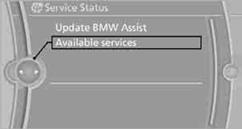
Manually updating BMW TeleServices, BMW Assist, and BMW Online.
"Update BMW Assist"
See also:
Interior
Drawing cues from the 7 Series, the 5 Series' climate-control readouts use
BMW's Black Panel technology to appear out of dark panels without the brightened
look of traditional electroluminescent d ...
Have maintenance carried out
Have vehicles maintained regularly to achieve
optimal vehicle economy and operating life.
Have the maintenance carried out by your service
center.
Please also note the BMW Maintenance System ...
Vehicle equipment
All standard, country-specific and optional
equipment that is offered in the model series is
described in this chapter. Therefore, equipment
is also described that is not available in a vehicle, ...