
General information
The channels are offered in predefined packages. The packages must be enabled by telephone.
Navigation bar overview
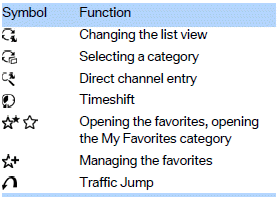
The functions of the navigation bar symbols can also be stored on the programmable memory buttons.
See also:
Power failure
After a temporary power loss, some equipment
needs to be reinitialized.
Individual settings need to be reprogrammed:
▷ Seat, mirror, and steering wheel memory:
store the positions again.
...
Malfunction
A message is displayed.
Adaptive light control is malfunctioning or has
failed. Have the system checked as soon as possible. ...
Initializing
In rare cases, it may become necessary to initialize
the Integral Active Steering.
The warning lamp lights up. A Check
Control message is displayed.
1. With the engine running, turn the steeri ...