
Brake Force Display
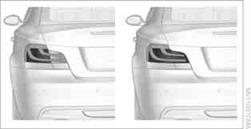
On the left: normal braking. On the right: sharp braking.
When the rear fog lampsare switched on, the Brake Force Display is not active and the illuminated area for normal braking is reduced by approximately half.
See also:
The concept
The vehicle can be accessed without activating
the remote control.
All you need to do is to have the remote control
with you, e.g., in your jacket pocket.
The vehicle automatically detects the ...
Display the calendar
Appointments during the last 20 and the next 50
days can be displayed.
1. "Office"
2. "Calendar"
The appointments on the current day are
displayed. ...
At a glance
General information
Contacts, appointments, tasks, notes, text messages,
and e-mails from the mobile phone can
be displayed on the Control Display if the mobile
phone provides compatible support o ...