
Wiper system
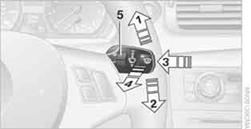
1. Switching on wipers
2. Switching off wipers or brief wipe
3. Activating/deactivating intermittent wipe or rain sensor
4. Cleaning windshield and headlamps
5. Setting speed for intermittent wipe, or sensitivity of the rain sensor
Press the lever upward, arrow 1.
The lever automatically returns to its initial position when released.
Normal wiper speed
Press once.
The system switches to operation in the intermittent mode when the vehicle is stationary.
Fast wiper speed
Press twice or press beyond the resistance point.
The system switches to normal speed when the vehicle is stationary.
Intermittent wipe or rain sensorIf the car is not equipped with a rain sensor, the intermittent-wipe time is a preset.
If the car is equipped with a rain sensor, the time between wipes is controlled automatically and depends on the intensity of the rainfall. The rain sensor is mounted on the windshield, directly in front of the interior rearview mirror.
Activating intermittent wipe or rain sensor
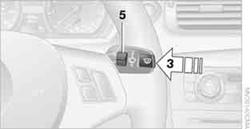
Press the button, arrow 3. The LED in the button lights up.
Setting speed for intermittent wipe or sensitivity of the rain sensor
Turn the thumb wheel 5.
Deactivating intermittent wipe or rain sensor
Press the button again, arrow 3. The LED goes out.
 Deactivate the rain sensor before entering an
automatic car wash. Failure to do so could result in damage caused by undesired
wiper activation.
Deactivate the rain sensor before entering an
automatic car wash. Failure to do so could result in damage caused by undesired
wiper activation.
Pull the lever, arrow 4.
Washer fluid is sprayed onto the windshield and the wipers are operated for a short time.
When the vehicle lighting system is switched on, the headlamps are cleaned at regular and appropriate intervals.
Do not use the washers if there is any danger
that the fluid will freeze on the windshield. If you do, your vision could be obscured. Antifreeze should therefore
be added to the fluid, refer to Washer fluid.
Do not use the washers when the washer fluid reservoir is empty; otherwise, you will damage the washer pump.
Windshield washer nozzles
The windshield washer nozzles are heated automaticallywhile the engine is running or the ignition is switched on.
See also:
Language
Setting the language
Setting the language
To set the language on the Control Display:
1. "Settings"
2. "Language/Units"
3. "Language:"
Language
4. Select the de ...
For US owners only
The transmitter and receiver units comply with
part 15 of the FCC/Federal Communication
Commission regulations. Operation is governed
by the following:
FCC ID:
▷ NBG009014A.
Compliance ...
Before mounting
If the rear seat backrests are adjustable:
Before mounting child restraint fixing systems,
return all of the rear seat backrests to the basic
position. ...