
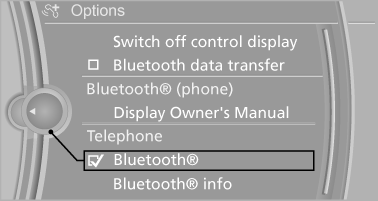
Activating/deactivating Bluetooth
Bluetooth is not permitted everywhere. Comply with all safety guidelines and regulations.
1. "Telephone"
2. Open "Options".
3. "Bluetooth®"
See also:
Cargo
Despite the X6's sloping back end, the SUV has more cargo room than a two-row
X5: 25.5 cubic feet as opposed to the X5's 21.9 cubic feet. The FX, meanwhile,
has 24.8 cubic feet of space. If you ne ...
CD/DVD playback
Inserting a CD/DVD
Insert the CD/DVD into the drive with the labeled side facing up. The CD/DVD
is drawn in automatically.
Playback starts automatically if the sound output is on. For CDs/DVDs w ...
Reserve display
A display in the instrument panel informs you
about the remaining distance can be covered
with the amount of fuel currently in the tank.
Reserve display
The reserve display appears approx.
1, ...