
Enlarging the cargo area
General information
The cargo area can be enlarged by folding down the rear seat backrests.
The rear seat backrest is divided into two parts at a ratio of 60 to 40.
If equipped with through-loading system: the rear seat backrest is divided in the ratio 40–20– 40.
 Danger of pinching
Before folding down the rear seat backrests,
ensure that the area of movement of the
backrests is clear. In particular, ensure that no
one is located in or reaches into the area of
movement of the rear seat backrests when the
middle section is folded down. Otherwise, injury
or damage may result.◄
Locking the backrest
Before driving with passengers in the rear
of the vehicle, make sure that the backrests are
engaged and thus locked in place. Otherwise,
the restraining effect of the safety belts may be
limited in an accident.◄
Ensure that the lock is securely engaged
When folding back the backrest, be sure
that it locks in place securely. The red warning
field in the control display disappears. If it is not
properly engaged, transported cargo could enter
the passenger compartment during braking
or evasive maneuvers and endanger the vehicle
occupants.◄
Using the middle safety belt
If the middle safety belt in the rear is used,
the larger section of the backrest must be
locked. Otherwise, the safety belt will not have
a restraining effect.◄
Folding down side
The right side can be folded down separately.
The left side can be folded down in combination with the middle section.
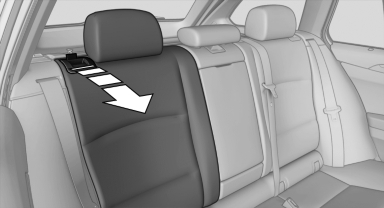
Reach into the recess and fold forward.
Folding down the middle section
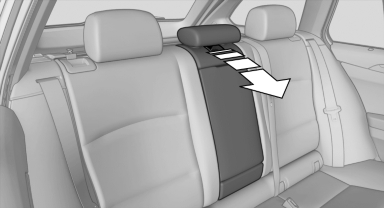
Reach into the recess and pull forward.
See also:
General information
The system supports you in entering street
names and house numbers by automatically
completing the entry and providing entry comparisons
Stored town/city and street names can be called
up quick ...
General information
Your vehicle contains advanced technology for
the reduction of fuel consumption and emissions.
Fuel consumption depends on a number of different
factors.
The implementation of certain measures, ...
Safety switch
The safety switch in the driver's door can be
used to prevent children, for example, from
opening and closing the rear windows using the
switches in the rear.
Switching on and off
Press the butt ...