
Instrument cluster
At a glance
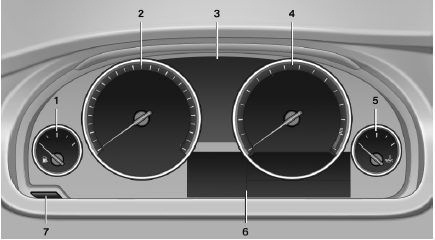
1 Fuel gauge
2 Speedometer
3 Indicator/warning lamps
4 Tachometer
5 Engine oil temperature
6 Electronic displays
7 Reset miles
See also:
Storage compartment in the rear
Storage compartment is located in the rear center
console. ...
Condensation under the parked vehicle
When using the automatic climate control, condensation
water develops that exits underneath
the vehicle.
Therefore, traces of condensed water under the
vehicle are normal. ...
Filtering the message list
The message list can be filtered when more than
one type of message exists.
1. "Filter:"
2. Select the type of message.
▷ "All"
All messages are displayed.
▷ & ...