
Opening/closing the sliding visor
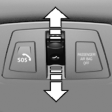 ► Press the switch in the
desired
direction to the resistance
point and hold it there.
► Press the switch in the
desired
direction to the resistance
point and hold it there.
The sliding visor moves while the switch is being held.
► Press the switch in the desired direction past the resistance point.
The sliding visor moves automatically.
Pressing the switch again stops the motion.
See also:
Switch off any functions thatare not currently needed
Functions such as seat heating and the rear window
defroster require a lot of energy and consume
additional fuel, especially in city and stopand-
go traffic.
Therefore, switch off these function ...
Storing music
General information
Music tracks from CDs/DVDs and USB devices
can be stored in the music collection on a hard
disc in the vehicle and played from there.
▷ Audio CD: tracks are converted i ...
Radio
Vehicle equipment
All standard, country-specific and optional
equipment that is offered in the model series is
described in this chapter. Therefore, equipment
is also described that is not avai ...