
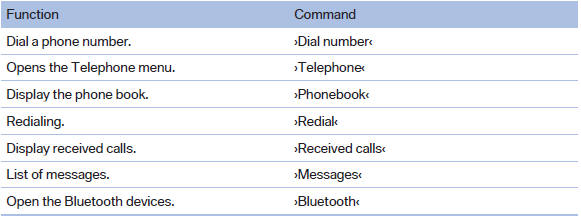
Telephone
See also:
Stored stations
General information
It is possible to store up to 40 stations.
Calling up a station
1. "Radio"
2. "Presets"
3. Select the desired station.
Storing a station
The station curr ...
Bypassing a section of the
route
Calculate a new route for a route section.
1. "Navigation"
2. "Route information"
3. "New route for"
New route for
4. Turn the controller. Enter the number of kilo ...
Instrument lighting
Adjusting
The parking lamps or low beams
must be switched on to adjust the
brightness.
Adjust the brightness using the
thumbwheel. ...