
Roadside Assistance
At a glance
BMW Roadside Assistance can be contacted if assistance is needed in the event of a breakdown.
Roadside Assistance can also be contacted via a Check Control message.
Start Roadside Assistance without BMW Assist or TeleServices
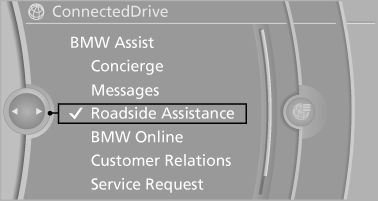
1. "BMW Assist" or "ConnectedDrive".
2. "Roadside Assistance"
The Roadside Assistance number is displayed.
If the mobile phone is paired, a connection is established to Roadside Assistance.
Start Roadside Assistance with BMW Assist or TeleServices
General information
If the vehicle is equipped with TeleServices, support is first offered through TeleService Diagnosis and, where applicable, then through TeleService Help.
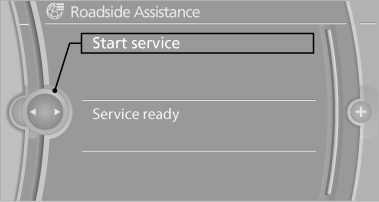
1. "BMW Assist" or "ConnectedDrive".
2. "Roadside Assistance".
3. "Start service"
TeleService Diagnosis
TeleService Diagnosis enables the wireless transmission of detailed vehicle data that are important for vehicle diagnosis. These data are transmitted automatically.
After the data are transmitted, the voice connection to Roadside Assistance is re-established.
See also:
Manual air distribution
The air distribution can be adjusted to individual
needs.
Press the button repeatedly to
select a
program:
Upper body region.
Upper body region and footwell.
Footwell.
...
Fuel cap
Opening
1. Briefly press the rear edge of the fuel filler
flap.
2. Turn the fuel cap counterclockwise.
3. Place the fuel cap in the bracket attached to
the fuel filler flap.
Closing
1. ...
Adjusting the volume
1. "CD/Multimedia", "Radio" or "Settings".
2. "Tone".
3. "Volume settings".
4. Select the desired volume setting.
5. To adjust: turn the control ...