
Video playback
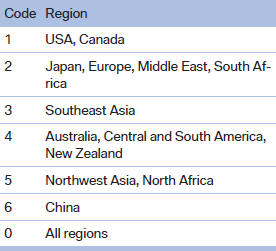
Country codes
Only DVDs with the code of the home region can be played back; also refer to the information on the DVD.
Playback
The video image is displayed on the front Control Display up to a speed of approx. 2 mph/3 km/ h; in some countries, it is only displayed if the parking brake is set or if the automatic transmission is in position P.
DVD video
1. "CD/Multimedia".
2. "CD/DVD".
3. Select a DVD with video content.
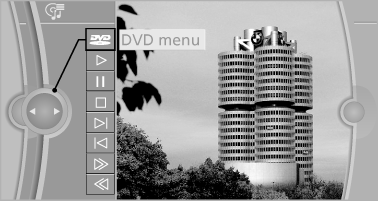
4.  "DVD menu"
VCD/SVCD
1. "CD/Multimedia".
2. "CD/DVD".
3. Select a CD with video content.
4.  "Select track".
5. Select the desired track.
Video menu
To open the video menu: turn the controller during playback.
Press the controller when "Back" is displayed.
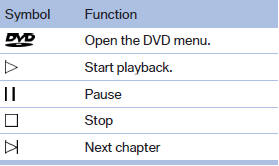
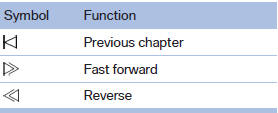
In fast forward/reverse: the speed increases every time the controller is pressed. To stop, start playback.
DVD menu
1. If necessary, turn the controller to open the video menu.
2.  "DVD menu".
The DVD menu is displayed. The display depends on the contents of the DVD.
3. To select menu items: move the controller and press it.
To change to the video menu: turn the controller and press it.
DVD/VCD settings
For some DVDs, settings can only be made via the DVD menu; refer also to the information on the DVD.
Selecting the language
The languages that are available depend on the DVD.
1. Turn the controller during playback.
2. Open "Options".
3. "Audio/language"
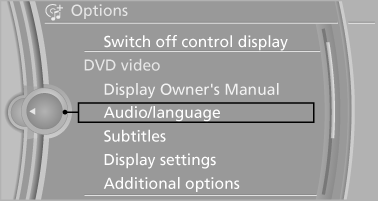
4. Select the desired language.
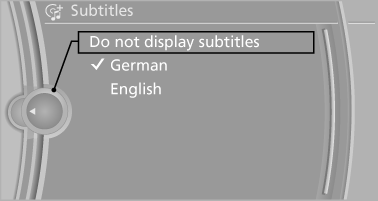
Selecting the subtitles
The subtitles that are available depend on the DVD.
1. Turn the controller during playback.
2. Open "Options".
3. "Subtitles".
4. Select the desired language or "Do not display subtitles".
Setting the brightness, contrast and color
1. Turn the controller during playback.
2. Open "Options".
3. "Display settings".
4. "Brightness", "Contrast" or "Color"
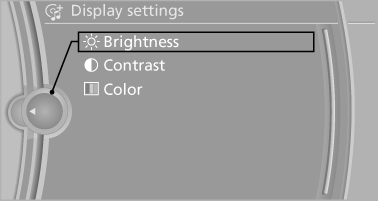
5. Turn the controller until the desired setting is reached and press the controller.
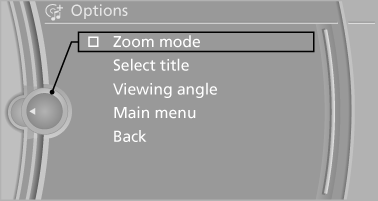
Selecting the zoom
Display the video image on the entire screen.
1. Turn the controller during playback.
2. Open "Options".
3. "Additional options".
4. "Zoom mode"
Selecting a track
DVD video:
1. Turn the controller when the DVD menu is displayed.
2. Open "Options".
3. "Additional options".
4. "Select title".
5. Select the desired track.
VCD/SVCD:
1.  "Select track".
2. Select the desired track.
Selecting the camera angle
The availability of a different camera angle depends on the DVD and the current DVD track.
1. Turn the controller during playback.
2. Open "Options".
3. "Additional options".
4. "Viewing angle".
5. Select the desired camera angle.
Opening the main menu, back
These functions are not contained on every DVD. Therefore, they may not be available for use.
See also:
Socket for OBD Onboard
Diagnosis
There is an OBD socket on the driver's side for
checking the primary components in the vehicle
emissions.
Emissions
▷ The warning lamp lights up:
Emissions are deteriorating. Have
th ...
Condition Based Service CBS
Sensors and special algorithms take into account
the driving conditions of your vehicle.
Based on this, Condition Based Service determines
the maintenance requirements.
The system makes it possi ...
Switching on/off
Press the button.
On: the LED lights up.
Off: the LED goes out.
The system can issue warnings at speeds above
approx. 30 mph/50 km/h.
The state is stored for the remote control currentl ...