
Front ventilation
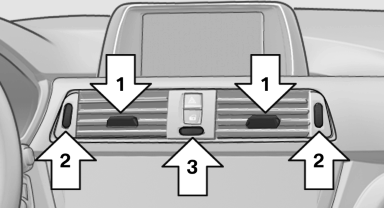
Front ventilation
▷ Lever for changing the air flow direction, arrow 1.
▷ Thumbwheels for opening and closing the vents continuously, arrows 2.
▷ Thumbwheel to vary the temperature, arrow 3.
Toward blue: colder.
Toward red: warmer.
Adjusting the ventilation
▷ Ventilation for cooling:
Adjust the vent to direct the air in your direction,
e.g., if the vehicle interior is hot from
the sun.
▷ Draft-free ventilation:
Adjust the vent to let the air flow past you.
See also:
The concept
Mobile phones or other external devices such as
audio players can be connected to the vehicle
via Bluetooth.
Bluetooth® is a registered trademark of Bluetooth
® SIG, Inc.
After these devices a ...
Assistance functions
Functional requirement
The backup camera is switched on.
The trunk lid is fully closed.
Pathway lines
Can be shown in the backup camera image
when in transmission position R.
Help ...
Correctly adjusted head restraint
A correctly adjusted head restraint reduces the
risk of injury to cervical vertebrae in the event of
an accident.
Adjusting the head restraint
Correctly adjust the head restraints of all
occu ...