
Automatic climate control
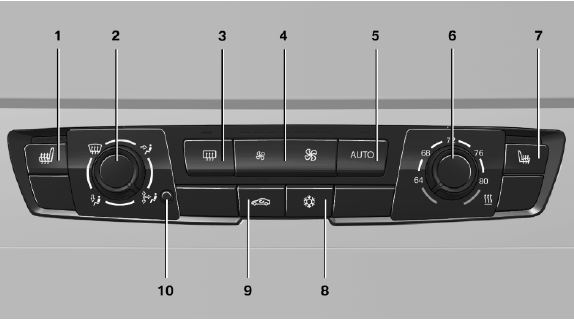
Automatic climate control
1 Seat heating, left
2 Vent settings
3 Rear window defroster
4 Air flow
5 AUTO program
6 Temperature
7 Seat heating, right
8 Cooling function
9 Recirculated-air mode
10 Interior temperature sensor — always keep clear
See also:
General information
Enclosed areas
Do not let the engine run in enclosed
areas; otherwise, breathing of exhaust fumes
may lead to loss of consciousness and death.
The exhaust gases contain carbon monoxide, an
od ...
LATCH child restraint fixing system
LATCH: Lower Anchors and Tether for Children. ...
Operating Apps
1. Connect the cell phone via the snap-in
adapter or via the USB audio interface.
2. "ConnectedDrive"
3. Select the desired software application. ...