
Display in the instrument cluster
The collision warning can be issued in the instrument cluster, in the Head-up Display, and acoustically.
Warning stages
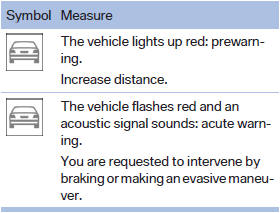
 Adapting your speed and driving
style
Adapting your speed and driving
style
The display does not relieve the driver of the responsibility to adapt his or her driving speed and style to the traffic conditions.
See also:
Opening and closing: from the
inside
Unlocking and opening
Either unlock the doors together using the
button for the central locking system and
then pull the door handle above the armrest
or
Pull the door opener twice in ...
Supplementary text messages
You can call up more information, e.g., on the
cause of a malfunction and on how to respond,
via Check Control.
In urgent cases, this information will be shown
as soon as the corresponding lamp ...
Message from the Concierge service
Starting destination guidance
1. Select the desired message.
2.
"Start guidance" or "Add as another
destination"
3. Start destination guidance, if necessary.
Dialing ...