
Display in the instrument cluster
The collision warning can be issued in the instrument cluster, in the Head-up Display, and acoustically.
Warning stages
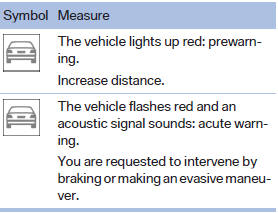
 Adapting your speed and driving style
The display does not relieve the driver of the responsibility to adapt his or her driving speed and style to the traffic conditions.
See also:
Tilting the glass sunroof
Push switch upward briefly.
The closed roof is tilted and
the sliding visor opens
slightly.
The opened roof closes until
it is in its tilted position. The sliding visor stays complete ...
Message from the Concierge service
Storing an address
1. Select the desired message.
2. "Options" Open.
3. "Store contact in vehicle"
Selecting additional functions
Additional functions are available when a mes ...
Deleting stored functions
Press and hold the left and right button on the
interior rearview mirror simultaneously for approximately
20 seconds until the LED flashes
rapidly. All stored functions are deleted. The
functi ...