
Display
 Display
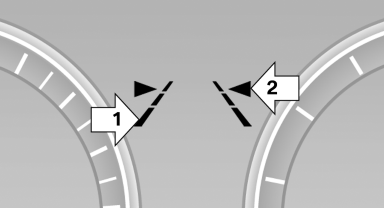
▷ Lines, arrow 1: the system is activated.
▷ Arrows, arrow 2: at least one lane marking was detected and warnings can be issued.
See also:
Control Display
Notes
▷ To clean the Control Display, follow the care
instructions
▷ Do not place objects close to the Control
Display; otherwise, the Control Display can
be damaged.
Switching of ...
First aid kit
The first aid kit is located in the container on the
inside of the trunk lid.
Unscrew the wing nut to open.
Some of the articles have a limited service life.
Check the expiration dates of the c ...
Switching the rear automatic climate
control on/off
1. "Settings"
2. "Climate"
3. "Rear climate control"
The rear automatic climate control is not operational
if the automatic climate control is
switched off or if t ...