
Buttons on the remote control
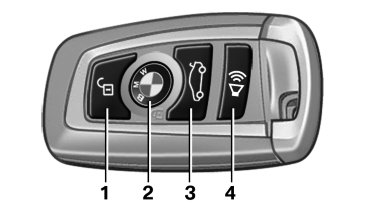
Buttons on the remote control
1 Unlocking
2 Locking
3 Opening the trunk lid
4 Panic mode in alarm system
See also:
Activating/deactivating the functions
Several menu items are preceded by a checkbox.
It indicates whether the function is activated
or deactivated. Selecting the menu item
activates or deactivates the function.
The function is ac ...
Switching the reception on/off
1. "Navigation"
2. "Options" Open.
3. "Receive Traffic Info" ...
Panic mode
In dangerous situations, trigger the alarm system:
Press the button on the remote
control for at
least 3 seconds.
To switch off the alarm: press any button. ...