
Radio
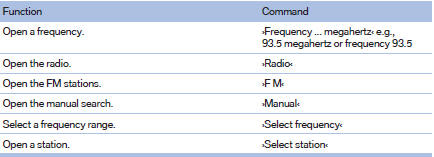
FM
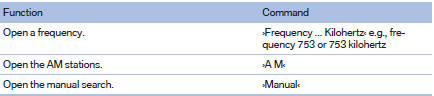
AM
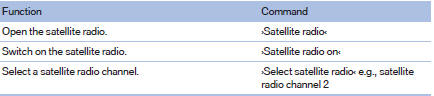
Satellite radio
Stored stations

See also:
Front
1. Fold up the wiper arm.
2. Fold the wiper blade upwards.
3. Remove the wiper blade toward the windshield,
refer to arrow. ...
Starting BMW Online
1. "BMW Assist" or "ConnectedDrive"
2. "BMW Online"
Starting BMW Online
3. If necessary, "OK".
The BMW Online home page is displayed. ...
Breaking-in period
General information
Moving parts need to be broken in to adjust to
each other.
The following instructions will help achieve a
long vehicle life and good economy.
Engine and differential
Always ...