
Starting the Concierge service
1. "BMW Assist" or "ConnectedDrive"
2. "Concierge"
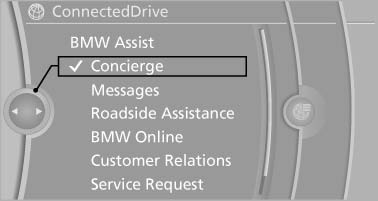
Starting the Concierge service
3. "Start service"
A voice connection is established with the BMW Assist Concierge service. Phone numbers and addresses can be transmitted to the vehicle.
Messages
Information on messages
See also:
Displaying, setting or changing the limit
1. "Settings"
2. "Speed"
3. "Warning at:"
Warning at
4. Turn the controller until the desired limit is
displayed.
5. Press the controller.
The speed limit is st ...
Insert the remote control into the ignition lock
Insert the remote control into the ignition lock
Insert the remote control all the way into the ignition
lock.
Radio ready state is switched on. Individual electrical
consumers can operate.
C ...
Changing between panels
After a menu item is selected, e.g., "Radio", a
new panel is displayed. Panels can overlap.
▷ Move the controller to the left.
The current panel is closed and the previous
panel ...