
Storing a channel
1. "Radio"
2. "Satellite radio"
3. If necessary, open "All channels" or the desired category.
4. Select the desired channel.
5. Press the controller again.
6. Press the controller again to confirm the highlighted channel.
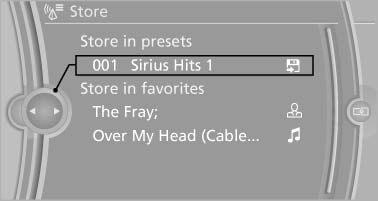
Press the controller again to confirm the
highlighted channel
7. Select the desired memory location.
The channels are stored for the remote control currently in use.
The channels can also be stored on the programmable memory buttons
See also:
Wiper blade replacement
General information
Do not fold down the wipers without wiper
blades
Do not fold down the wipers if wiper blades have
not been installed; this may damage the windshield.◄
Replacing the fro ...
Features
Like most up-level BMWs these days, the 650i can be equipped with a dizzying
array of technological wizardry. Ours came equipped with an optional lane
departure warning and correction system, adap ...
General information
Your vehicle contains advanced technology for
the reduction of fuel consumption and emissions.
Fuel consumption depends on a number of different
factors.
The implementation of certain measures ...