
Selecting channels
You can only listen to enabled channels.
The selected channel is stored for the remote control currently in use.
Via the iDrive
1. "Radio"
2. "Satellite radio"
3. Select "All channels" or the desired category.
4. Select the desired channel.
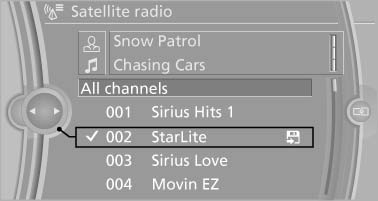
Select the desired channel
Via the button on the radio
 Press the button.
The next channel is selected.
Via direct channel entry
1. "Radio"
2. "Satellite radio"
3.  "Set channel"
4. Turn the controller until the desired channel is reached and press the controller.
See also:
USB audio interface/mobile phone
audio interface
At a glance
It is possible to connect external audio devices.
They can be operated via iDrive. The sound is
output on the vehicle loudspeakers
Connectors for external devices
▷ Connection ...
Driving experience: benchmark dynamics and exceptional comfort.
Highly advanced drivetrain and suspension technologies combine agile handling
for the driver and a high standard of riding comfort for passengers. When
equipped with the Sport Package, the new BMW ...
Stowing cargo
▷ Heavy cargo: stow as far forward and as low
as possible, ideally directly behind the cargo
area separating wall.
▷ Very heavy cargo: when the rear seat is not
occupied, secure e ...