
Navigation bar overview
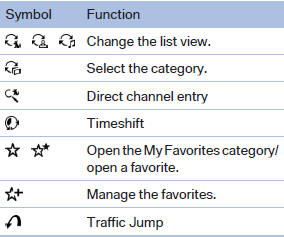
The functions of the navigation bar symbols can also be stored on the programmable memory buttons
See also:
Controls
1 Change the entertainment source
2 Eject CD/DVD
3 CD/DVD drive
4 Change station/track
5 Programmable memory buttons
6 Volume, on/off ...
Entering letters and numbers
1. Turn the controller: select letters or numbers.
2. Select additional letters or numbers ifneeded.
3. "OK": confirm the entry.
Symbol
Function
Press the controlle ...
Calling up the desired speed and
distance
While driving
Press the button with the system
switched on.
In the following cases, the stored speed value is
deleted and cannot be called up again:
When the system is switched off.
When ...