
Controls
Controls
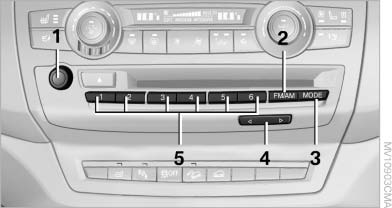
1 Volume, on/off
2 Change wave band
3 Change entertainment sources
4 Change station/track
5 Programmable memory buttons
See also:
Opening the list of traffic bulletins
1. "Navigation"
2. "Map"
3. "Traffic
Info"
First, traffic bulletins for the calculated route
are displayed.
The traffic bulletins are sorted by their distance
...
Entertainment
The chapter helps assure your enjoyment when
receiving radio and television stations and playing
CDs, DVDs and tracks from the music collection. ...
Folding in display screen
When using the ski bag or when transporting
bulky pieces of luggage, the display screen
should be folded in, as otherwise it may be damaged.
Note when the display screen is folded
down
When ...