
Adjusting the volume
1. "CD/Multimedia", "Radio" or "Settings"
2. "Tone"
3. "Volume settings"
4. Select the desired volume setting.
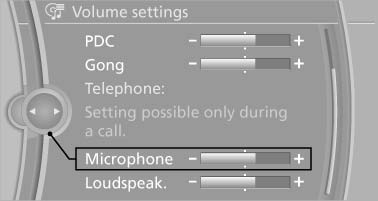
Select the desired volume setting
5. To adjust: turn the controller.
6. To store: press the controller.
See also:
Dynamic Drive
The concept
Dynamic Drive reduces the lateral inclination of
the vehicle that occurs during rapid driving in
curves or during quick evasive maneuvers.
Driving stability and driving comfort are i ...
Selecting channels
You can only listen to enabled channels.
The selected channel is stored for the remote
control currently in use.
Via the iDrive
1. "Radio"
2. "Satellite radio"
3. Select &qu ...
Massage function in rear seats
Wavelike motions from the top to the bottom in
the backrest relax back muscles.
Button in rear
Switching on
To switch on, press the button
once for
each massage level.
The highest level i ...