
Multi-channel playback, surround
Setting multi-channel playback, surround
1. "CD/Multimedia", "Radio" or "Settings"
2. "Tone"
3. "Surround"
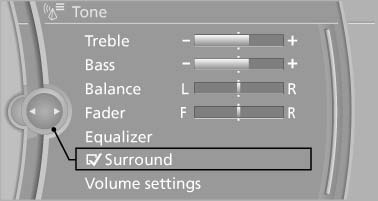
Surround
When surround is activated, multi-channel playback is simulated when a stereo audio track is played.
See also:
Massage function in rear seats
Wavelike motions from the top to the bottom in
the backrest relax back muscles.
Button in rear
Switching on
To switch on, press the button
once for
each massage level.
The highest level i ...
Reminders
Displaying reminders
Reminders of pending appointments and tasks
are displayed. After an appointment or after a
task is due, the reminder is no longer displayed.
1. "Office"
2. " ...
Adaptive Drive
The concept
Adaptive Drive* includes the following systems:
Dynamic Drive
Dynamic Damping Control
The system increases driving stability and driving
comfort. ...