
Equalizer
Setting for individual audio frequency ranges.
Adjusting the equalizer
1. "CD/Multimedia", "Radio" or "Settings"
2. "Tone"
3. "Equalizer"
4. Select the desired setting.
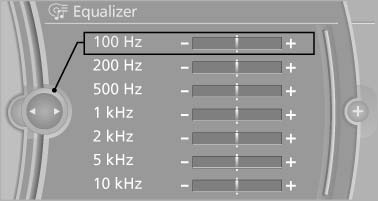
Select the desired setting
5. To adjust: turn the controller.
6. To store: press the controller.
See also:
Start/Stop button
The concept
Pressing the Start/Stop button
switches the ignition on or off and
starts the engine.
The engine starts if the brake
pedal is pressed when you press
the Start/Stop button. ...
Units of measure
Setting the units of measure
To set the units for fuel consumption, route/distance,
temperature, and pressure:
1. "Settings"
2. "Language/Units"
Language/Units
3. Select t ...
Transmission positions
D Drive, automatic position
Position for normal vehicle operation. All forward
gears are available.
R is Reverse
Select only when the vehicle is stationary.
N is Neutral
Use in automatic car wa ...