
Setting treble, bass, balance, and fader
1. "CD/Multimedia", "Radio" or "Settings"
2. "Tone"
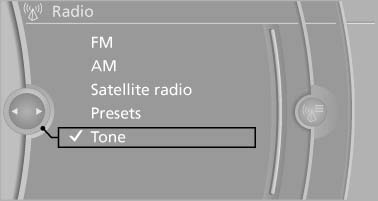
Tone
3. Select the desired tone settings.
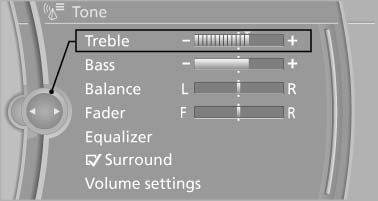
Select the desired tone settings
4. To adjust: turn the controller.
5. To store: press the controller.
See also:
Connecting a specific device
If more than one device is detected by the vehicle,
the device at the top of the list is connected.
A different device can be connected by selecting
it.
1. "Telephone"
2. "Blueto ...
Contacts
Vehicle equipment
All standard, country-specific and optional
equipment that is offered in the model series is
described in this chapter. Therefore, equipment
is also described that is not availab ...
Menu navigation
The transmission time of the remote control is
limited by law. To execute a function again,
press or turn the required button again. ...