
Storing the position
The current position can be stored in the address book.
1. "Navigation"
2. Open "Options".
3. "Store position as contact" or "Add position to contact"
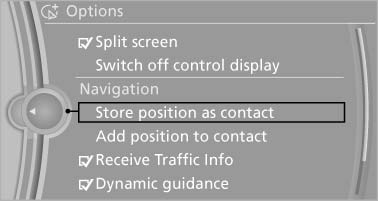
Store position as contact
4. Depending on the selection, choose an existing contact from the list. Select the type of address and enter the first and last name.
5. "Store in vehicle"
See also:
Turn signal, high beams,headlamp flasher
Turn signal
Using turn signals
Press the lever beyond the resistance point.
To switch off manually, press the lever to the resistance
point.
Unusually rapid flashing of the indicator lamp i ...
Incoming call
Receiving calls
If the number of the caller is stored in the phone
book and is transmitted by the network, the
name of the contact is displayed. Otherwise,
only the phone number is displayed.
...
SPORT
Consistently sporty tuning of the suspension for
greater driving agility with maximum driving stabilization.
The program can be configured to individual
specifications.
The configuration is stor ...