
USB interface for data transfer
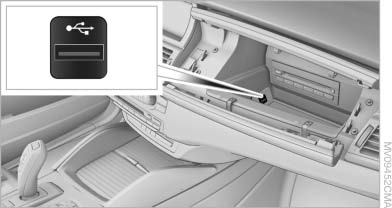
USB interface for data transfer
Port for importing and exporting data, such as music collections, on USB devices.
Observe the following when connecting:
▷ Do not use force when plugging the connector
into the USB interface.
▷ Do not connect devices such as fans or
lamps to the USB interface.
▷ Do not connect a USB hard drive.
▷ Do not use the USB interface to recharge
external devices.
See also:
Possible commands
Most menu items on the Control Display can be
voiced as commands.
The available commands depend on which
menu is currently displayed on the Control Display.
There are short commands for function ...
Having possible commands read aloud
You can have the available commands read out
loud for you: ›Voice commands‹
For example, if the "Settings" menu is displayed,
the commands for the settings are read out loud. ...
Cleaning the windshield and headlamps
Pull the lever, arrow 4.
The system sprays washer fluid on the windshield
and activates the wipers briefly.
When the vehicle lighting system is switched on,
the headlamps are cleaned at regular ...