
Display
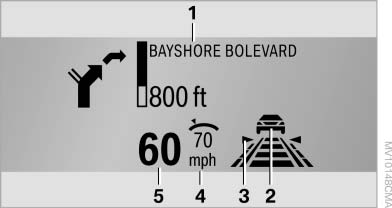
Display
1 Navigation instructions
2 Active Cruise Control with Stop & Go function
3 Lane departure warning
4 Cruise control/desired speed
5 Current speed
The Check Control messages are displayed briefly if needed.
Selecting displays in the Head-up Display
1. "Settings"
2. "Head-up display"
3. "Displayed information"
4. Select the desired displays in the Head-up Display.
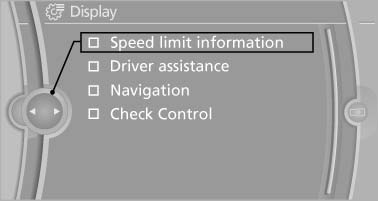
Selecting displays in the Head-up
Display
The settings are stored for the remote control currently in use.
Setting the brightness
The brightness is automatically adjusted to the ambient light.
The basic setting can be adjusted manually.
1. "Settings"
2. "Head-up display"
3. "Brightness"
4. Turn the controller.
The brightness is adjusted.
With the low beams switched on, the brightness can also be adjusted with the thumbwheel of the instrument lighting.
The setting is stored for the remote control currently in use.
Height adjustment
1. "Settings"
2. "Head-up display"
3. "Height"
4. Turn the controller.
The height is adjusted.
The setting is stored for the remote control currently in use.
See also:
Adaptive light control
The concept
Adaptive light control is a variable headlamp
control system that enables dynamic illumination
of the road surface.
Depending on the steering angle and other parameters,
the light ...
Traffic bulletins on the map
General information
"Traffic conditions/gray map" Active: indication
on the control display is switched to shades of
gray. This enables a better view of the traffic
bulletins. Day/nig ...
Arming and disarming the alarm system
General information
When you lock or unlock the vehicle, either with
the remote control or at the door lock, the alarm
system is armed or disarmed at the same time.
Door lock and armed alarm sys ...