
Image on the Control Display
The traffic area to the left and right is displayed on the Control Display.
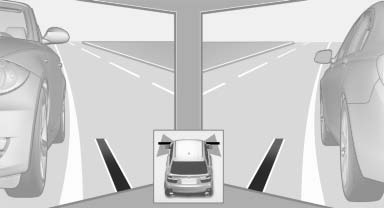
Image on the Control Display
Guidelines at the bottom of the image show the position of the front of the vehicle.
Brightness
With the Side View switched on:
1.  "Brightness"
2. Turn the controller until the desired setting is reached and press the controller.
Contrast
With the Side View switched on:
1.  "Contrast"
2. Turn the controller until the desired setting is reached and press the controller.
See also:
Rear CD/DVD player
1 CD/DVD slot
2 Eject CD/DVD
3 On/off, right
4 Headphone connection, right
5 RCA sockets
6 Headphone connection, left
7 On/off, left ...
For US owners only
The transmitter and receiver units comply with
part 15 of the FCC/Federal Communication
Commission regulations. Operation is governed
by the following:
FCC ID:
▷ NBG009014A.
Compliance ...
xDrive
xDrive is the all-wheel-drive system of your vehicle.
The combined effects of xDrive and DSC
further optimize the traction and dynamic driving
characteristics. The 4-wheel drive system
xDrive v ...