
Image on the Control Display
Switching on the rear view camera using iDrive
With Top View activated:
 "Rear
view camera"
The image of the rear view camera is displayed.
"Rear
view camera"
The image of the rear view camera is displayed.
The setting is stored for the remote control currently in use.
Brightness
With Top View switched on:
1.  "Brightness"
2. Turn the controller until the desired setting
is reached and press the controller.
"Brightness"
2. Turn the controller until the desired setting
is reached and press the controller.
Contrast
With Top View switched on:
1.  "Contrast"
2. Turn the controller until the desired setting
is reached and press the controller.
"Contrast"
2. Turn the controller until the desired setting
is reached and press the controller.
Displaying turning lines and pathway lines
▷ The static, red turning line shows the lateral
space required when the wheel is fully
turned.
▷ The variable, green pathway lines assist you
in estimating the amount of lateral space actually
required.
The pathway lines depend on the current steering angle and are continuously adapted to movements of the steering wheel.
 "Parking aid lines"
Turning lines and pathway lines are displayed.
"Parking aid lines"
Turning lines and pathway lines are displayed.
Cameras
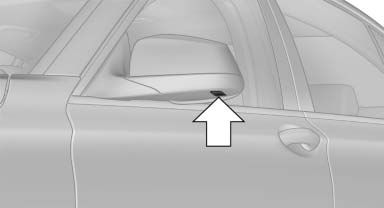
Cameras
The lenses of the Top View cameras are on the undersides of the exterior mirror housings.
The presence of dirt can impair image quality.
Clean the lens with a moist, nonabrasive cloth.
See also:
General information
Refuel promptly
Refuel below a range of 30 miles/50 km;
otherwise, engine functions are not ensured and
damage may occur. ...
External devices
At a glance
...
Wiper blade replacement
General information
Do not fold down the wipers
without wiper
blades
Do not fold down the wipers if wiper blades have
not been installed; this may damage the windshield.
Replacing the wiper ...