
Displays in instrument cluster
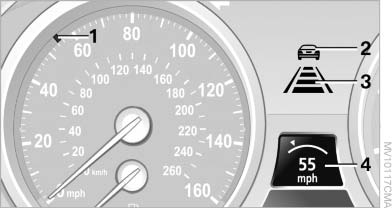 Displays in instrument cluster
1 Stored desired speed
▷ Green: the system is active.
▷ Orange: the system is interrupted.
2 Lights up yellow: vehicle detected ahead Display also used for warnings, please read all information on warnings.
3 Selected distance to vehicle ahead The indicator lights up as soon as the system is activated.
The indicator lights up as soon as the system is activated.
The bars roll: the vehicle in front of you has driven off.
4 Brief display of stored desired speed If the display --- mph/---km/h appears briefly, the conditions necessary for operation may currently not be met.
Warning lamps
 Display 2 flashes
red and a signal
sounds.
Display 2 flashes
red and a signal
sounds.
The system requests that the you intervene by braking and carrying out evasive maneuvers, if necessary.
The system cannot independently restore the distance to the vehicle ahead.
This display does not relieve the driver of the responsibility to adapt his or her desired driving speed and style to the traffic conditions.
 Display 2 flashes
yellow.
Display 2 flashes
yellow.
The conditions necessary for operation of the system are no longer met, e.g., due to ABS or DSC intervention. The system applies the brakes until you actively assume control.
See also:
Notes
Working in the engine
compartment
Never attempt to perform any service or
repair operations on your vehicle without the
necessary professional technical training.
If you are unfamiliar with t ...
Safety
The BMW 650i has not been crash-tested by the National Highway Traffic Safety
Administration and Insurance Institute for Highway Safety. Neither organization
typically tests low-volume cars with s ...
Modern cockpit with clear orientation to the driver
The cockpit is inclined towards the driver at an angle of approximately 7°
and the asymmetrically designed center console likewise emphasizes this clear
orientation to the driver. The horizontal l ...