
Selecting the distance
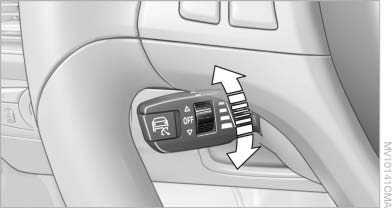
Selecting the distance
▷ Press the rocker down briefly:
Increase the distance.
▷ Press the rocker up briefly:
Decrease the distance.
▷ Press the rocker down briefly:
Increase the distance.
▷ Press the rocker up briefly:
Decrease the distance.
 Distance 1, closest
 Distance 2
 Distance 3
 Distance 4,
furthest
This distance is set when you activate
the system.
Distance 4,
furthest
This distance is set when you activate
the system.
 Selecting an appropriate distance
Use good judgement to select the appropriate
following distance given road conditions,
traffic, applicable laws and State driving recommendations
for safe following distance. Otherwise,
a violation of the law or risk of an accident
could result.◀
See also:
Contrasting light surfaces imbue the rear with brio and energy
The strong horizontal lines of the rear - including rear lights in customary
BMW L-shaped design positioned at the outer edges of the back end - accentuate
the broad face of the wheels and wide tr ...
Possible commands
Most menu items on the Control Display can be
voiced as commands.
The available commands depend on the menu
that is currently displayed on the Control Display.
The functions of the main menu hav ...
Entry comparison
Entry of names and addresses: the selection is
narrowed down every time a letter is entered and
letters may be added automatically.
The entries are continuously compared to the
data stored in t ...