
Activating the High-beam Assistant
1. Turn the light switch to .
2. With the low beams switched on, briefly push the turn indicator lever in the direction of the high beam.
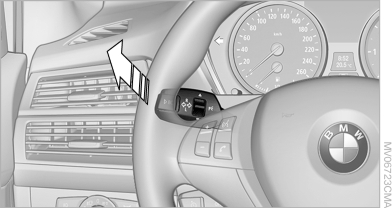
Activating the High-beam Assistant
 The indicator lamp
in the instrument
cluster lights up. The high beams are
switched on and off automatically.
The indicator lamp
in the instrument
cluster lights up. The high beams are
switched on and off automatically.
The system responds to light from oncoming traffic and traffic driving ahead of you, and to adequate illumination, e.g., in towns and cities.
See also:
Switching on/off and interrupting
cruise control
Switching on
Press the button on the steering
wheel.
The indicator lamps in the instrument cluster
light up and the marking in the speedometer is
set to the current speed.
Cruise control c ...
BMW Search
At a glance
A business search can be opened via BMW
Search.
License conditions
This product contains NetFront Browser software
of ACCESS Co., Ltd. Copyright © 2007
ACCESS Co., Ltd. All rights ...
Software update
The vehicle supports various external devices, depending on the software it is
currently using. A software update can enable the vehicle to support new mobile
phones or new external devices, for e ...