
Entering dates
Enter the dates for the required inspections.
Make sure the date on the Control Display is set correctly
1. "Vehicle Info"
2. "Vehicle status"
3.  "Service
required"
"Service
required"
4. "§ Vehicle inspection"
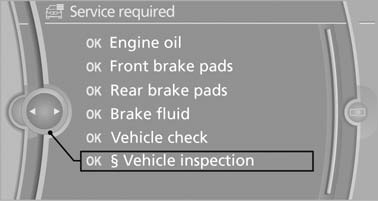
Vehicle inspection
5. Open the menu for entering the deadline.
6. "Date:"
7. Create the settings.
8. Press the controller to apply the setting. The year is highlighted.
9. Turn the controller to make the adjustment.
10. Press the controller to apply the setting. The date entry is stored.
To exit from the menu:
Move the controller to the left.
See also:
View of an opened menu
When a menu is opened, it generally opens with
the panel that was last selected in that menu. To
display the first panel of a menu:
▷ Move the controller to the left repeatedly
until the ...
Planning a trip with intermediate destinations
New trip
A trip can be planned with several intermediate
destinations.
1. "Navigation"
2. "Map"
3. Move the controller to the left if necessary.
4. "Guidance"
5. ...
Folding table* in the rear
A folding table is contained in the backrest of the
front seat. ...