
Displaying information on the instrument panel
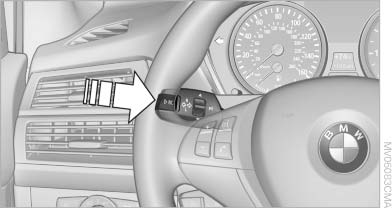
Displaying information on the
instrument panel
Press the computer button on the turn signal lever.
Information is displayed in the instrument cluster.
See also:
Office
Vehicle equipment
All standard, country-specific and optional
equipment that is offered in the model series is
described in this chapter. Therefore, equipment
is also described that is not avai ...
Vehicle equipment
This Owner's Manual describes all models and
all standard, country-specific and optional
equipment that is offered in the model series.
Therefore, in this Owner's Manual, equipment is
also desc ...
Lighter
Danger of burns
Only hold the hot lighter by its knob; otherwise,
there is the danger of getting burned.
Switch off the ignition and take the remote control
with you when leaving the vehicle so ...