
Storing
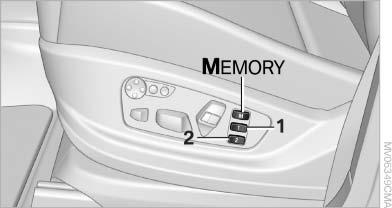
Storing
1. Switch on the radio ready state or the ignition
2. Set the desired seat, exterior mirror and steering wheel positions.
3.  Press the button. The LED in
the
button lights up.
Press the button. The LED in
the
button lights up.
4. Press the desired memory button 1 or 2. The LED goes out.
If the M button is pressed accidentally:
 Press the button again. The LED
goes
out.
Press the button again. The LED
goes
out.
See also:
Treble, bass, balance, and
fader
▷ "Treble": treble adjustment.
▷ "Bass": depth adjustment.
▷ "Balance": left/right volume distribution.
▷ "Fader": front/rear volume ...
Display
The Control Display shows how xDrive and Dynamic
Performance Control are distributing the
drive forces.
1. "Vehicle Info"
2. "Torque distribution"
Torque distribution
The ...
Avoid high engine speeds
Driving at a low engine speed reduces fuel consumption
and minimizes wear. ...