
BMW Online
At a glance
You can use BMW Online to search the yellow pages.
License conditions:
This product contains NetFront Browser software of ACCESS Co., Ltd. Copyright © 2007
ACCESS Co., Ltd. All rights reserved.
NetFront is a trademark or registered trademark of ACCESS Co., Ltd., in Japan and other countries.
This software is based in part on the work of the Independent JPEG Group.
Requirements
> Subscription to the optional Convenience Plan.
> The vehicle is located within wireless network coverage.
> The date setting on the Control Display is current.
1. "BMW Assist" or "ConnectedDrive"
2. "BMW Online"

3. "OK" if necessary
The BMW Online start page is displayed.
Using BMW OnlineTo select and display content:
> Turn the controller to highlight an element.
> Press the controller to display an element.
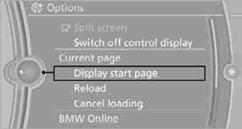
Opening the start page
1. Open "Options".
2. "Display start page"
Loading a new page
1. Open "Options".
2. "Reload"
Canceling
1. Open "Options".
2. "Cancel loading"
See also:
Controls
Before operation
Before operating a system using the
integrated universal remote control, ensure that
there are no people, animals, or objects within
the range of movement of the remote-contro ...
Camera
The camera is located near the base of the mirror.
Keep windshield clean and clear in the area in
front of the interior rear view mirror. ...
General information
1. Turn the controller: select letters or numbers.
2. Select additional letters or numbers if
needed.
3. "OK": confirm the entry.
...