
Roadside Assistance
At a glance
BMW Roadside Assistancecan be contacted if assistance is needed in the event of a breakdown.
Contact with BMW Roadside Assistancecan also be established using a Check Control message.
Starting BMW Roadside Assistance without BMW Assist or BMW TeleServices
1. "BMW Assist" or "ConnectedDrive"
2. "Roadside Assistance"
BMW Roadside Assistance number is displayed. If a mobile phone is paired, a connection to BMW Roadside Assistance is established.
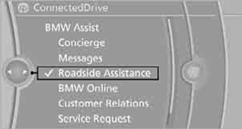
Starting BMW Roadside Assistance with BMW Assist or BMW TeleServices
In a vehicle with BMW TeleServices, assistance is first offered through the BMW Teleservice diagnosis and then if necessary, through the BMW Teleservice help.
1. "BMW Assist" or "ConnectedDrive"
2. "Roadside Assistance"
3. "Start service"
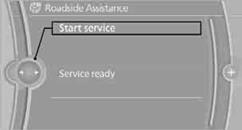
BMW Teleservice DiagnosisTeleservice Diagnosis enables the wireless transmission of detailed vehicle data that are critical to vehicle diagnosis. Teleservice Diagnosis can be started after a prompt by Roadside Assistance and termination of the voice connection.
BMW Teleservice HelpTeleservice Help enables an in-depth diagnosis of the vehicle by Roadside Assistance via wireless transmission.
Teleservice Help can be started after a prompt by Roadside Assistance and termination of the voice connection.
Starting BMW Teleservice Help
1. Park the vehicle in a safe place.
2. Set the parking brake.
3. The engine is running.
4. "TeleService Help"
After completion of Teleservice Help, a voice connection is established to Roadside Assistance.
See also:
Settings for the map view
The settings are stored for the remote control
currently in use.
1. "Navigation"
2. "Map"
3. "Options" Open.
4. "Settings"
Set the map view.
▷ &qu ...
Temperature
Turn the wheel to set the desired
temperature.
The automatic climate control achieves this
temperature as quickly as possible, if necessary
with the maximum cooling or heating capacity,
and ...
Manually unlocking fuel filler flap
In the event of a malfunction, the fuel filler flap
can be released manually:
1. Open the right-hand side panel in the cargo
area.
2. Pull the knob with the gas pump symbol.
Manually unlockin ...