
New contact
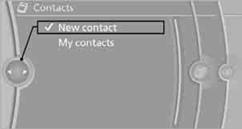
1. "Contacts"
2. "New contact"
3. If input boxes are already filled with previous entries: "Delete input
fields"
4. To fill in the entry fields: select the symbol next to the entry field.
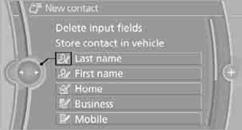
5. Entering text.
When equipped with a navigation system: enter address. It is only possible to enter addresses that are contained in the navigation data stored in the vehicle. This ensures that destination guidance is possible for all addresses.
6. "Store" if necessary
7. "Store contact in vehicle"
It is possible to store a home address. It is listed at the beginning of the contacts.
1. "Home"
2. Create a contact.
3. "Store contact in vehicle"
See also:
Compatibility
If this symbol is printed on the
packaging
or in the instructions of the hand-held
transmitter, the remote-controlled device is
generally compatible with the integrated universal
remote con ...
Phone book
Displays
The phone book accesses the contacts and
shows all contacts for which a phone number
has been stored. The entries can be selected to
make a call.
1. "Telephone".
2. "P ...
Brake assistant
When you apply the brakes rapidly, this system
automatically produces the maximum braking
force boost. It thus helps to achieve the shortest
possible braking distance during full braking.
This ...