
Using contact data
At a glance
Contact data from appointments, tasks, text messages, emails, and notes can be stored or selected, refer to page.
Displaying a contact or selecting a phone number
1.  "Use contact data"
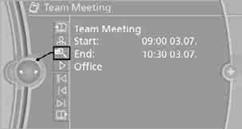
2. To display a contact or dial a phone number:
> Select a contact to display a detailed view of the contact.
> Select a phone number to directly establish a connection.
1. "Use contact data"
2. Highlight a phone number or email address.
3. Open "Options".
4. "Add to existing contact" or "Store as new contact"
See also:
The concept
The integrated universal remote control can operate
up to 3 functions of remote-controlled systems
such as garage door drives or lighting systems.
The integrated universal remote control
replac ...
Video playback
Country codes
Only DVDs with the code of the home region can
be played back; also refer to the information on
the DVD.
Playback
The video image is displayed on the front Control
Display up to ...
Arming and disarming the alarm system
General information
When you lock or unlock the vehicle, either with
the remote control or at the door lock, the alarm
system is armed or disarmed at the same time.
Door lock and armed alarm sys ...