
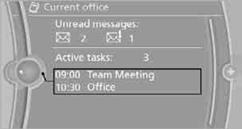
Current office
The number of unread messages and active tasks as well as upcoming appointments are displayed.
1. "Office"
2. "Current office"
3. Selecting the desired entry to display details.
See also:
Vehicle equipment
All standard, country-specific and optional
equipment that is offered in the model series is
described in this chapter. Therefore, equipment
is also described that is not available in a vehicle, ...
Top View
The concept
Top View assists you in parking and maneuvering.
The area around the doors and the road area
around the vehicle are shown on the Control
Display for this purpose. ...
Unpairing the mobile phone
1. "Telephone"
2. "Bluetooth® (phone)"
3. Highlight the mobile phone that is to be unpaired.
4. Open "Options".
5. "Remove phone from list" ...